So for Ray.new(), the two arguments are the Start Position, and the Direction.
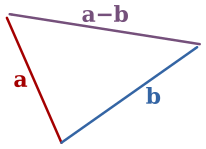
An easy way of calculating the Direction in this instance is to find the Unit, which is the Vector3 position 1 stud away from Vector3.new(0, 0, 0) in that direction. To find the unit, you can subtract the End Position from the Start Position to give you a single Vector that defines the difference between the two Vectors, then use the .Unit part of that Vector to give you the unit.
Picture a straight road, if you are 10km from the start of that road, and your destination is 20km from the start of that road, you can do EndPosition (20km) - StartPosition (10km) and it will give you the difference between you and that destination (10km). Your example is the same maths, just using a 3D position vectors instead.
For the second part, where it is positioning the beam along your Ray. When you set a part's CFrame, it will move the centre of that part to the CFrame you have given it. Sometimes, like in this example, that's not ideal as the beam's centre would be at your Tool's Handle part position which means half of it would stick out behind, and the other half would stick out infront. To offset this, *CFrame.new(0, 0, -distance/2) [Multiplying CFrames together like this adds the components] would offset your beam by half the distance of the beam, which means the start of the beam would align with the middle of your tool's handle, which is what you want.
Apologies for the poor explanation, it's a difficult one to get your head around without images.

1 comment
Maybe elaborate just a bit, dumb it down for me please.