
I only know about team changers but the Game pass team changer I don't know I tried thinking about it but all I came up is nothing please help me
COMMUNITY QUESTION
How can i make a team changer gp so when a player buys game pass he can click gui to become an team?
1 answer
First, you can start by making a ScreenGui and putting a TextButton inside of that, like shown here.
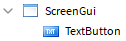
After you have done that, you are ready to edit it to your liking.
Now, you can now insert a LocalScript inside of that TextButton like shown here.
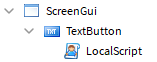
Inside of that script, you want to start by detecting a click with MouseButton1Click and running a function whenever somebody clicks that button
script.Parent.MouseButton1Click:Connect(function()

end)
With this, you want to fire an event to the server, so the server can change the player's team from there. This is important with FilteringEnabled.
There are various ways to do this, but I just went with this
script.Parent.MouseButton1Click:Connect(function()
	game:GetService("ReplicatedStorage"):WaitForChild("gamepassTeam"):FireServer()
end)
Of course, you need to place a RemoteEvent in ReplicatedStorage named "gamepassTeam" like shown.
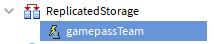
At this point, all you need to do now is change the team from the server. To do this, you'll need to place a Script inside of ServerScriptService like I did here.
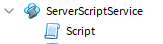
Inside of this script, you will need to utilize the .OnServerEvent API to detect whenever the event fires
game:GetService("ReplicatedStorage"):WaitForChild("gamepassTeam").OnServerEvent:Connect(function(player)

end)
At this point, all you need to do is check if the player owns the gamepass and change the player's team if so.
To do this, all you need to do is use :UserOwnsGamepassAsync to check if the player owns the gamepass. Using this, the code should now look like this
game:GetService("ReplicatedStorage"):WaitForChild("gamepassTeam").OnServerEvent:Connect(function(player)
	if game:GetService("MarketplaceService"):UserOwnsGamePassAsync(player.UserId, 2296901) then

	end
end)
(Replace '2296901" with the ID of your gamepass)
Finally, to change the player's team, it's as simple as this
game:GetService("ReplicatedStorage"):WaitForChild("gamepassTeam").OnServerEvent:Connect(function(player)
	if game:GetService("MarketplaceService"):UserOwnsGamePassAsync(player.UserId, 2296901) then
		player.TeamColor = BrickColor.new("Bright red")
	end
end)
(Remember to change "Bright red" to the team color you want)
If you want the player to immediately respawn after changing teams, you can just LoadCharacter.
game:GetService("ReplicatedStorage"):WaitForChild("gamepassTeam").OnServerEvent:Connect(function(player)
	if game:GetService("MarketplaceService"):UserOwnsGamePassAsync(player.UserId, 2296901) then
		player.TeamColor = BrickColor.new("Bright red")
		player:LoadCharacter()
	end
end)
This discussion is preserved as it was. New answers, comments, and votes are closed.
1 comment
This is of course when the player already owns the gamepass. If you want to prompt the player to buy a gamepass, or creating the gamepass itself, thats a different story.