
Scripting HelpersARCHIVE
A little piece of Roblox history. Preserved for everyone, one question at a time.Read about the archive →
✓ ANSWER ACCEPTED

How do I make my bullet hole go onto a wall like a bullet hole?

I'm making a gun and I've been trying to figure this out for an hour now. I need the bullet hole on the wall when I shoot my mildly good gun. Any help would be appreciated. (this is part of the code by the way)

if shootable == true and script.Parent.CurrentMag.Value > 0 then
script.Parent.Remotes.Shot:FireServer()
local hole = Instance.new("Part",workspace)
hole.Color = Color3.fromRGB(27, 42, 53)
hole.Anchored = true
hole.CanCollide = false
hole.Size = Vector3.new(0.46, 0.05, 0.56)
hole.CFrame = mouse.Hit
hole.Material = Enum.Material.Granite
hole.Orientation = Vector3.new(mouse.Target)
Debris:AddItem(hole, 7)

It perfectly goes onto the wall but I can't figure out the Orientation.

hole.Orientation = Vector3.new(mouse.Target)
1 answer

✓ Accepted answer

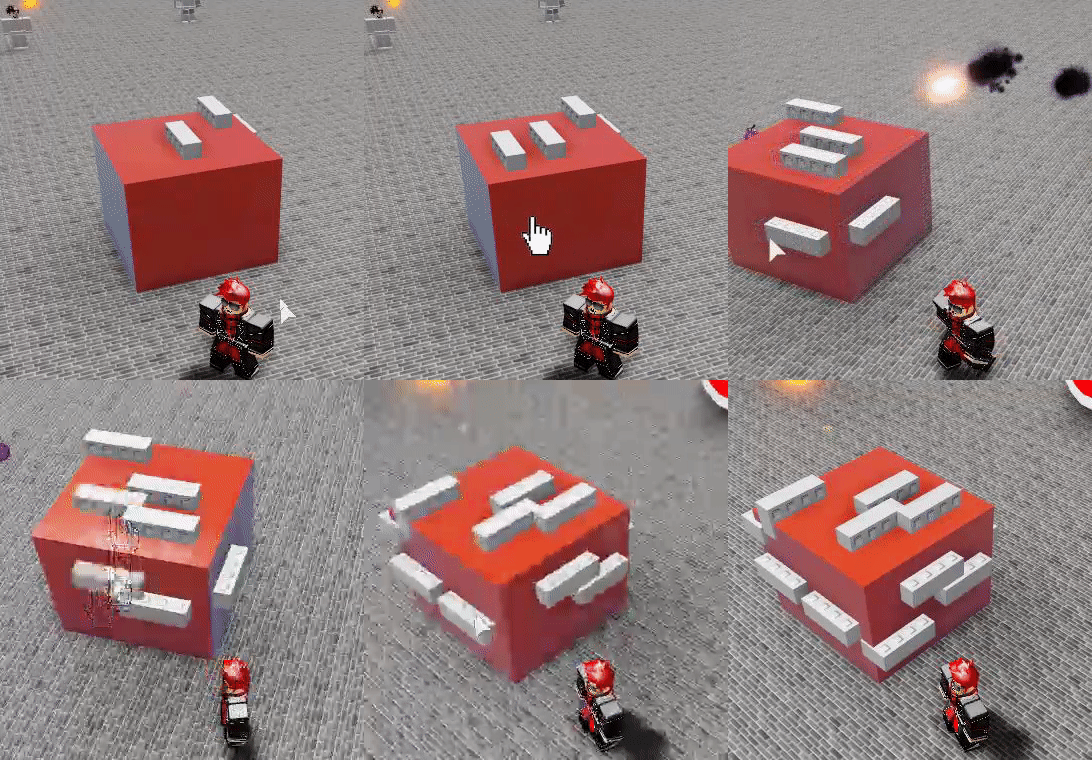
Hey for this I recommend using a ray! it can work quite well, here's an example script I made and a GIF of it:

GIF

Code:

local p = game.Players.LocalPlayer
local m = p:GetMouse()
local c = workspace.CurrentCamera
--ray
local r = Ray.new(c.CFrame.Position, (m.Hit.Position - c.CFrame.Position).Unit * 500)
-- part properties
local part, pos, normal = workspace:FindPartOnRay(r, p.Character) print(part, pos, normal) 
local p = Instance.new("Part") 
p.Anchored = true 
p.Parent = workspace 
-- CFrame
p.CFrame = CFrame.new(pos, pos + normal)

By setting the part's cframe using normal it will adjust itself to the part's orientation, being able to always see it properly.

To add it to your script, simply do something similar to what I did.

So this is just an example but it should be something like this:

if shootable == true and script.Parent.CurrentMag.Value > 0 then
--my part
local p = game.Players.LocalPlayer
local m = p:GetMouse()
local c = workspace.CurrentCamera
local r = Ray.new(c.CFrame.Position, (m.Hit.Position - c.CFrame.Position).Unit * 500, p.Character)

--THINGS TO NOTE: 500 is the range of the ray, so it will not go further than 500 studs, feel free to edit that to whatever you want.

local part, pos, normal = workspace:FindPartOnRay(r, p.Character)

-- the argument p.Character is what to ignore, so it will not apply it to your own character.


--end of my part
script.Parent.Remotes.Shot:FireServer()
local hole = Instance.new("Part") -- don't use the parent argument of Instance.new
hole.Parent = workspace
hole.Color = Color3.fromRGB(27, 42, 53)
hole.Anchored = true
hole.CanCollide = false
hole.Size = Vector3.new(0.46, 0.05, 0.56)
hole.CFrame = CFrame.new(pos, pos + normal) -- changing this
hole.Material = Enum.Material.Granite
-- deleting hole.Orientation
Debris:AddItem(hole, 7)

This discussion is preserved as it was. New answers, comments, and votes are closed.