Namaste it is i, dual
First of all, I would like to say the method :playerFromCharacter() is deprecated
(https://developer.roblox.com/en-us/api-reference/function/Players/playerFromCharacter)
While on the topic of deprecation, the :connect method is deprecated as well - I recommend you use :Connect instead.
This means you should not use this method as support for it will be ended some time in the future. Instead, consider using the method :GetPlayerFromCharacter()
(https://developer.roblox.com/en-us/api-reference/function/Players/GetPlayerFromCharacter)
Second of all, using wait(n)s in your code, 9 times out of 10, is not neccesary, and there is always a better alternative. I can't particularly help you with those issues (since I don't know why you're using wait()), but I can recommend you research alternatives. I recommend starting here: https://devforum.roblox.com/t/avoiding-wait-and-why/244015
Thirdly, I recommend using local variables in your code. It is a good practise, especially for Lua, and you can read on why it's such here: https://www.lua.org/pil/4.2.html, and a more technical read here: https://stackoverflow.com/questions/26154960/local-vs-global-in-lua. I also recommend reading more on scopes here: http://lua-users.org/wiki/ScopeTutorial and here: https://stackoverflow.com/questions/10654823/lua-variables-scope
Fourthly, I recommend indenting (using tabs to space your code at the start of the line). While Lua does not need it, it is always a good practice as it significantly increases your code's readability and if you decide to adventure to other languages, such as Python, indenting is necessarily.
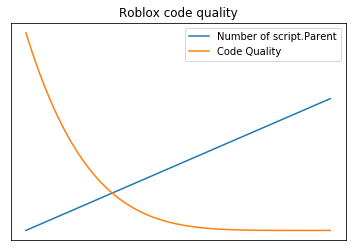
Fifthly, script.Parent is also never a good code practise. Sure it may be quick solution in some scripts at time, but that's all it is - expedient. You will realise soon how much you regret spamming .Parent repeatedly, rather than referencing that position with variables instead.
Consider this satirical graph by Quenty: https://pbs.twimg.com/media/DQYWZ2xVoAA4Z_o.png:large
Now, let's get on to changes I've made in your code.
- I have changed your code from
	local Player = game.Players:playerFromCharacter(char.Parent)
	local Humanoid = Player.Character.Humanoid
to
	local player = Players:GetPlayerFromCharacter(char)
	local Humanoid = char.Humanoid
Because before, you used Player.Character to access Humanoid even though you already had a reference to character. It goes without saying this is counter productive and inefficient. I'm sure it was a mistake.
I have also given the function a more descriptive name - onTouched. Variable names that make sense is obviously important for coherent code.
I also use the method :GetService() to get the Players service. This is the correct way to access services.
As @TopBagon also answered above, I changed line 8 to
player.leaderstats.coins.Value = player.coins.Value + math.random(1,30)
from
player.leaderstats.coins.Value = player.leaderstats.coins.Value + math.random(1,30)
So the final script should look something like:
local Part = workspace.Part
local Players = game:GetService("Players")
local function onTouch(char)
	local player = Players:GetPlayerFromCharacter(char)
	local Humanoid = char.Humanoid
	if (Part.Transparency == 0) then
		player.leaderstats.coins.Value = player.leaderstats.coins.Value + math.random(1,30)
		Part.Parent:Destroy()
	end
end

Part.Touched:Connect(onTouch)
Even if I didn't fix your code, I hope you learned something
(Oh, and to answer your question, Player is nil because when you're doing game.Players:playerFromCharacter(hit.Parent) you're doing game.Players:playerFromCharacter(workspace) as hit.Parent would be workspace, because that's where all the characters are parented to, and the character is what touched the part. )
That is all

2 comments
oh
and i forgot what i changed