
Alright so I've been spending 30 minutes or so trying to work out how you'd make a form of guidance system eg; like this
https://gyazo.com/bd5591f6b970cb5cab902b3e00ab21ec
destination = workspace.Destination1
local newarrow = arrow:Clone()
newarrow.Parent = localPlayer.Character
newarrow.CanCollide = false
newarrow.Anchored = false
local weld
weld = Instance.new("Weld", newarrow)
weld.Part0 = newarrow
weld.Part1 = newarrow.Parent.Head
weld.C0 = CFrame.new(0, -2, 0)
The above is the script of the cloning and welding of the arrow
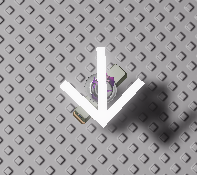 With the arrow spawning above the head.
Would appreciate any help, even just a suggestion of how to get it working.
3 comments
Well you can use CFrame to point the arrow in the correct direction. CFrame.new(Vector3.new(arrowPosition.X, 0, arrowPosition.Z), Vector3.new(destinationPos.X, 0, destinationPos.Y)) will make it point to the correct direction without it looking up or down (assuming you don't use welding and use RunService). As of pointing it on the corners of the screen, I would like to know as well.
Negative ghost rider, I'm using weld but i'm open to suggestions.
You should try using math.atan2