
Hi again,
I've been stumped on this for quite a while but now that I found scriptinghelpers I really hope you guys could help me out on this :)
Basically, I am trying to get input from when the user interacts with a BillboardGui object. (more specifically the frames inside of the gui). My issue seems to be that the GuiObject events aren't triggering at all.
According to the wiki, every GuiObject instance has an event "InputBegan", which is fired when the user interacts with the GuiObject using a mouse, touch, keyboard, etc. My goal is for the ui element to be able to read user keyboard inputs, but it seems that no matter what input I do the event doesn't fire.
I've set up a LocalScript as shown in this image, and tested to make sure that the script is running by executing a print statement, and it did in fact run.
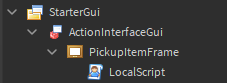
I've set up a couple of event connections to see if maybe it was just the InputBegan event, but it's replicated for every event.
Here is my local script code:
local frame = script.Parent

print("Hello from " .. frame.Name .. "! The LocalScript is running!")
-- printed successfully


frame.InputBegan:Connect(function(input)
	print("input began! " .. tostring(input))
end) -- no response


frame.MouseMoved:Connect(function(x, y)
	print("mouse moved, x: " .. x .. " y: " .. y)
end) -- no response
I've also tried setting up a LocalScript inside StarterPlayerScripts, then actively search for the ui element and run the exact same code, but I am left with identical results.
In addition to this, I've tried setting up a Script object inside with identical content, but I net the same result as I did previously.
I understand that ContextActionService can allow me to use the InputBegan event as well, but it would really be a huge help if I were able to receive inputs only when the user interacts with the gui.
I can't seem to identify the problem here, I hope you guys can help me out on this! :)
4 comments
In line 3, you tried to concatenate an object. Instead do .. frame.Name .. Same on line 8. Make .. input .. to ..tostring(input).. and on lines 7 and 12, you used :connect when it’s :Connect. Don’t use deprecated code as ROBLOX has plans to remove it.
Deprecated code doesn't necessarily mean that it's going to be removed, it just means that it can be removed and they don't recommend using it. I agree that people should be using :Connect, there's a small chance that Roblox is going to remove :connect, however.
Oof. I didn't know that there was a new Connect, I just recently came back to ROBLOX. Thanks for that. The frame.Name and input stuff is unnecessary and was only to show that the script was running but I appreciate the catches.
Just because code is deprecated does not mean Roblox has plans to remove it. There is almost no chance roblox will remove :connect() due to the amount of older scripts that would break. But Roblox recommends not using deprecated code for a reason.