
So I know how module scripts work and how to require them, but I have no idea how often or when I should be using them. I mean should I use one for every event? Like PlayerAdded, script.Parent.Touched, and stuff like that? I am confused about the benefits and maybe that is why I don't use them, but so many tutorials say that they are very important. Could someone please enlighten me? Thank you.
✓ ANSWER ACCEPTED
How often should I be using module scripts?
2 answers
✓ Accepted answer
ModuleScripts are amazingly beneficial to your games, and they have a few main benefits:
They allow you to re-use and share your code so it can be used in different places. The Don't Repeat Yourself principle of programming states that you should eliminate repetition wherever possible.
They allow you decompose your programs into smaller, more understandable chunks.
We're seeing a shift towards a single-script architecture, in which you have only one Script and one LocalScript in your game, and everything else is a ModuleScript. Modules require other modules, and so on.
Single-script architecture is proving to be the best way to write code on Roblox, and I believe it'll become the standard as the platform matures, and games grow in complexity. Modularization is good!
Though I'd design it differently now, here's what the entire client-side of a commission looked like with single-script architecture. On one of crazyman32's projects, here's what the client-side script structure looks like.

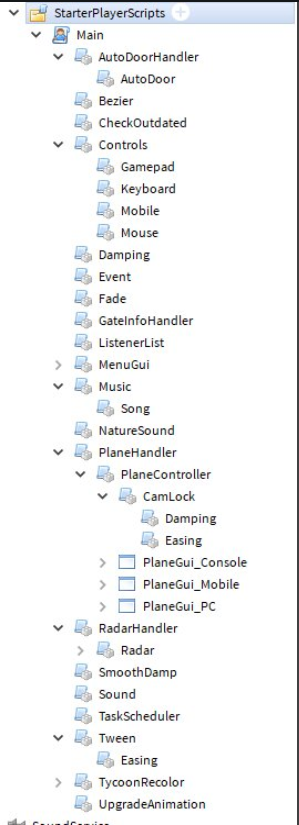
The idea is that your code flows from the single entry point at the top downwards, and each level of modules provides an abstraction around the module's job. This approach allows you to easily see how your game's logic flows.
When you have certain code that needs to be used both client-side and server-side, it can help to separate that functionality into a shared module (placed into game.ReplicatedStorage) that both the client and the server can access.
You could look into some of the Roblox templates for examples of modularization, that can be found when opening a new window of Roblox Studio.
2 comments
0
Could you help me understand how that single server side script should look? If not thats ok I just need a little help and dont know where to find it.
0
Most of the logic in my personal main server-scripts involves mostly requiring other modules, sometimes with the main game loop if it's round-based, say. The main script should actually be pretty small, and you can delegate tasks to modules.
In my general idea, you should use ModuleScripts when there's something that'll pop up often in your script and you don't want to type that something out every time you need to use it; especially if it's a large something
E.G. There's a snippet (or whichever word I should use) of code on wiki.roblox.com which is a ModuleScript that implements a debouncer into scripts.
The snippet:
function debounce(func)
    local isRunning = false    -- Create a local debounce variable
    return function(...)       -- Return a new function
        if not isRunning then
            isRunning = true

            func(...)          -- Call it with the original arguments

            isRunning = false
        end
    end
end

return debounce
And how to use it:
-- hi i'm a regular 'ol script
local debounce = require(game.Workspace.DebounceModule) -- require the module (It doesn't have to be game.Workspace.DebounceModule, it can be anything
script.Parent.Touched:Connect(debounce(function(hit) -- The ModuleScript shown above returns a "variadic function"; read up on it here: https://wiki.roblox.com/index.php?title=Variadic_function
-- oh cool it links
	print("Button Touched")
	wait(3)
	print("Waited")
end)) -- the second parenthese is NOT a mistake; it's for the `<eof>` of the debounce modulescript
I would say use a ModuleScript if it's something that pops up three times in total.
(Tip: You can use ModuleScripts as an alternative to _G by doing stuff like this:
return true

) -- code isn't the only thing that has <eof>! lol
2 comments
0
Is that the only reason module scripts exist? Thank you for the answer though.
0
Well... they really can be for who-knows-what. The only limit is your imagination :P
This discussion is preserved as it was. New answers, comments, and votes are closed.
8 comments
Use them if you want to make your own functions for other scripts to use them or something like that.
Not very helpful
Only use them when multiple scripts have a 'large' code in common
But what if it is only one script?
Also I would like a more comprehensive answer
I'll write a more comprehensive answer on this
Ok please do thank you
If it is better than the one already provided I will choose yours instead