
for i, player in ipairs(game.Players:GetChildren()) do
SGGUI = Instance.new("ScreenGui")
SGGUI.Parent = script.Parent:findFirstChild("tpscript") --Change this to the name of your script
SGGUIT = Instance.new("TextBox")
SGGUIT.Parent = SGGUI
SGGUIT.Size = UDim2.new(.25, 0, .1, 0) --Change this to whatever you want the size to be
SGGUIT.Font = "SourceSansBold" --Change this to whatever you want the font to be
SGGUIT.FontSize = "Size18" --Change this to whatever you want the font size to be
SGGUIT.BackgroundColor3 = Color3.new(.128, .128, .128) --Change this to whatever you want the background color to be
SGGUIT.TextColor3 = Color3.new(1,1,1)
SGGUI.Parent = player.PlayerGui

beep.Pitch = .5

SGGUIT.Text = "Game Starting in 5"
beep:Play()
wait(1)
SGGUIT.Text = "Game Starting in 4"
beep:Play()
wait(1)
SGGUIT.Text = "Game Starting in 3"
beep:Play()
wait(1)
SGGUIT.Text = "Game Starting in 2"
beep:Play()
wait(1)
SGGUIT.Text = "Game Starting in 1"
beep.Pitch = 1
beep:Play()
wait(1)
SGGUI:Destroy()
end
Basically, before the round starts a Gui pops up and has a number count down from 5 to 1. It works fine on its own, but when there is more than one player, not every player gets the gui at the same time, instead it gives each player the gui and countdown individually. Basically, once the gui counts down and destroys for player one, it will then go to player two, rather than doing both players at the same time. Can someone help me fix this issue, it'll be a big issue if there are a lot of players in the game.
2 comments
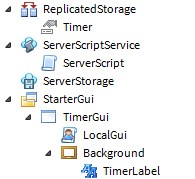
Why use the table? You can just set Gui to game.Lighting.TimerGui:clone()
If you had multiple guis