
I am referring to the portals in the valve game, although they work like you'd expect -- through a particular space on a portion of a wall, a difference scene is visible through.
(This is a large project and I don't at all expect a code answer, just ideas and suggestions from other scripters who have different perspectives)
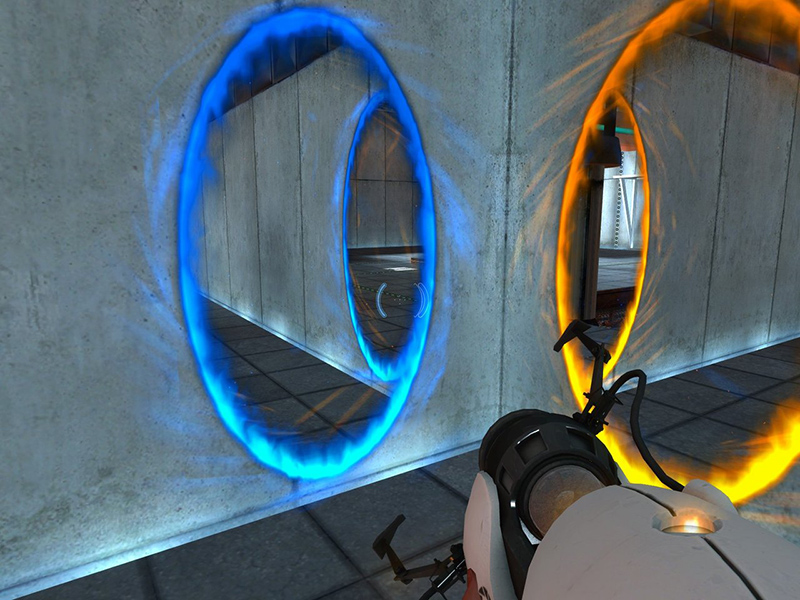
This is a feature which I really want in my Portal game which unfortunately I don't think will be able to come with high enough quality to make me happy.
I'm open to suggestions here to see if I can get any further on it. Here are the things I have tried or are thinking about trying:
Render a number of Decals and select among the best fit based on portal locations This works from a gameplay perspective -- it helps you line up and figure out what's on the other side. It won't be even close to seamless and will still require the transition. Curating, labeling, and uploading large numbers of decals is intractable. One solution is to use SurfaceGuis to piece together scenes, which might work pretty well and could even perhaps have DOOM style 3D to improve it. Depending on how static I want it to be it could be camera independant and so only needs to be computed once.
Use raycasting to render a rasterized scene onto a surface GUI. This would capture the same as above, would better fit the scene's positions but be much lower resolution, however the lighting & texturing fit would be even worse. It's probably intractably slow to actually accomplish. Again, could be static since it would be not seamless anyway.
Use projection to render a polygon based scene onto a surface GUI. This would be faster for "perfect" resolution, but for complex maps could be very slow. Again, lighting & texturing would be impossible to do perfectly, so there would still be a transition. Again, might be static to save processing time since it wouldn't be seamless.
Use projection to render polygons parts Same as above, but perhaps some better quality. Almost surely slower.
Project the chamber to the behind of the portal, cut out portal. Cutting out the portal is difficult / possibly impossible when trying to preserve textures. Portals would need to be square or aligned to a grid or perhaps both. To be static this significantly restricts the complexity of chambers as they must be wholly or essentially wholly convex.
Project the chamber to the back, but cull This allows the chamber to be not convex, but it involves hiding "real" parts through the viewport of the portal and hiding "fake" parts that are not through that area on the screen. In addition to that it would require cutting large bricks to fit within the correct view regions. The constant projection and modifying of parts could / will be very slow.
Project the chamber to the camera, make tiny. I have done this, and it works. It's just extremely slow and still requires culling of the close-up chamber.
I don't know if this is the correct venue for this sort of discussion, but I thought I'd give it a try. What do you all think might work for this sort of thing? Obviously I don't expect full code answers, but what methods could be employed here that I have not thought of, or to improve upon the suggestions I have?
Thank you.
2 comments
I haven't played Portal yet, do the portals basically just put a hole in the wall? That's what it looks like from the image that you provided.
They act as surveillance cameras, showing the way out of the other one. Here's a better illustration: http://media.moddb.com/images/mods/1/18/17776/vault.jpg