
Scripting HelpersARCHIVE
A little piece of Roblox history. Preserved for everyone, one question at a time.Read about the archive →
COMMUNITY QUESTION

Why does this script work in studio but not in game?

This script is supposed to display the players walkspeed, but when I'm in game it gives me this error: http://i.gyazo.com/bbe9732d8378f0a5d0909bb64b8be539.png
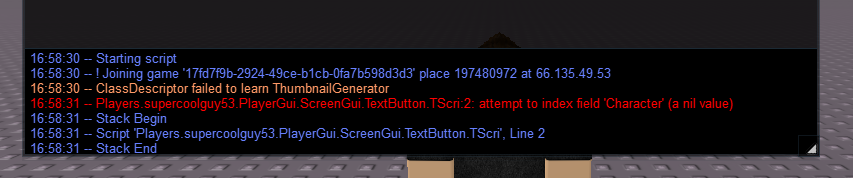
I thought 'Character' is how you edit the player itself.

Here is the script:

--TextScript
game.Players.LocalPlayer.Character.Humanoid.Changed:connect(function()
	script.Parent.Text = ("WalkSpeed: ".. game.Players.LocalPlayer.Character.Humanoid.WalkSpeed)
end)

Here is what's it's supposed to look like (gif is a little short)

http://i.gyazo.com/6b14b559a425d85ee4d614e5614941be.gif

Here is what it really looks like

http://i.gyazo.com/669f31c996b0fd7eb4981d0464c602b3.gif

Here is the game

http://www.roblox.com/more-testing-place?id=197480972

2 comments

0

no one?

0

Stay tuned, writing your answer!

2 answers

So it looks like the GUI just does the tweening activity without the Walkspeed changing. I think it's because there's a few properties of Humanoid that change without you knowing. To fix this, just modify the function a little by adding the property variable.

game.Players.LocalPlayer.Character.Humanoid.Changed:connect(function(property)
if property == "WalkSpeed" then
--put your tweening code here
end
end)

By adding the "property" variable, we can check to make sure that the property that's changing is the WalkSpeed property, so that the tweening code doesn't execute unless the WalkSpeed actually changes. I'm not 100% sure that you can do this with a LocalScript, so try both types of scripts.

If this answer helps, please upvote and accept!

2 comments

0

repeat wait() until game.Players.LocalPlayer.Character is all i had to do before the function

0

Ok. Does that mean my script works or doesn't work?

You get that error because the player's character isn't loaded, so it's nil. You can get around the error by waiting for the character to load, or to use the CharacterAdded event.

This discussion is preserved as it was. New answers, comments, and votes are closed.