
Algorithm to get x and y pos, an alternative instead of doing this manually:
How could I rotate a rotate-able object from a specified point?
Algorithm to get x and y pos, an alternative instead of doing this manually:
How could I rotate a rotate-able object from a specified point?
The point that you want to rotate is P1, which has coordinates (x1, y1). The point that you want to rotate around is P2, which has coordinates (x2, y2).
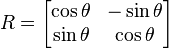
The general two-dimensional rotation matrix is #cos(angle) -sin(angle) #sin(angle) cos(angle) See this Image
Note: Angles for the trigonometric Lua functions are given in radians, not degrees.
You want to rotate P1 around P2, which is the same as rotating (P1 - P2) around the origin (0,0) and then translating by P2. Matrix rotations rotate coordinates around the origin. So you'll calculate P1 - P2, apply the rotation matrix, then translate the calculated coordinate by P2.
You may not be familiar with matrix multiplication. At some point in life, you'll want to learn about it, but at the moment you probably just want an intro and some useable ideas.
#Multiplying a Coordinate by a Matrix
inputx, inputy = 1,1 --an example 2-dimensional vector

angle = math.rad(45) --convert your angle in degrees to radians, same as math.pi/2 in this case

--calculate rotation matrix elements
x1 = math.cos(angle)
y1 = math.sin(angle)
x2 = -y1 --(-sin(angle))
y2 = x1 --they are both cos(angle)

outputx, outputy = x1 * inputx + x2 * inputy, y1 * inputx + y2 * inputy
--the output coordinate is the input coordinate rotated by the angle
You could make this into a function and avoid storing x2 and y2 so that it looks cleaner and saves memory:
function Rotate(x,y,angle) --assuming you want to specify the angles in degrees
	local radians = math.rad(angle)

	local x1, x2 = math.cos(radians), math.sin(radians)
	--local x2, y2 = -y1, x1

	return x1 * x - y1 * y, y1 * x + x1 * y --outputx and outputy
end
Now if you want to rotate (x,y) around another coordinate (p,q), you only have to add in the steps I outlined in the beginning (subtract (p,q) from (x,y), rotate, then add (p,q) to (x,y)):
function RotateAround(x,y, angle, p,q) --assuming you want to specify the angles in degrees
	local radians = math.rad(angle)

	local x1, x2 = math.cos(radians), math.sin(radians) --the rotation matrix stays the same
	x, y = (x - p), (y - q) --subtract the coordinate that you rotate around
	return x1 * x - y1 * y + p, y1 * x + x1 * x + q --notice +p and +q, we add the 'anchor' back on
end
Depending on how you intend to use this, you may want to make a function that handles using UDim2 or Vector2 instead of receiving individual coordinates as arguments.
Obviously you'll also have to set the Rotation property of the GuiObject that you want to manipulate in the example you gave, as the processes above only compute coordinates.
As I said in the comment on your question, you'll have to make sure you use the right coordinates (scale, offset, or absolute position) depending on what exactly you are rotating and how. Hopefully you'll be able to figure that out.
I hope this helps and, if you have any further questions, please feel free to ask follow up questions.
This discussion is preserved as it was. New answers, comments, and votes are closed.
4 comments
:O Hey! oioi how you doing!
Your question isn't very clear. You want to calculate the x and y positions of what?
In the image I've rotated the OBJECT by 45 degrees on the left top vertex. Any way to do it mathematically?
Matrix transformations will allow you to rotate an object around a point. You'll have to use the same method separately for both absolute and relative coordinates for each object, though.