
Scripting HelpersARCHIVE
A little piece of Roblox history. Preserved for everyone, one question at a time.Read about the archive →
COMMUNITY QUESTION

How would I make the mouse go in a full circle and not create negative degrees?

Im trying to make a turret system where the seat will follow the mouse rotation, however the mouse doesn't seem to make a full circle in degrees 0-360 instead it goes from 90 to -90. Im using a hinge so i have to convert the mouse pos to degrees. How would I prevent the mouse degrees from going negative and instead make it follow the 0-360

Code

local player = game:GetService("Players").LocalPlayer
local mouse = player:GetMouse()
local hinge = workspace.mover:WaitForChild("HingeConstraint")
local runService = game:GetService("RunService")

local mouseang
local degree

runService.RenderStepped:Connect(function()

	mouseang = -math.asin((mouse.Hit.Position).Unit.X)
	degree = math.deg(mouseang)
	print(degree)
	hinge.TargetAngle = degree

end)

Here is a video of whats happening

https://media.giphy.com/media/NTyexgTq6AZFpPdN9Y/giphy.gif
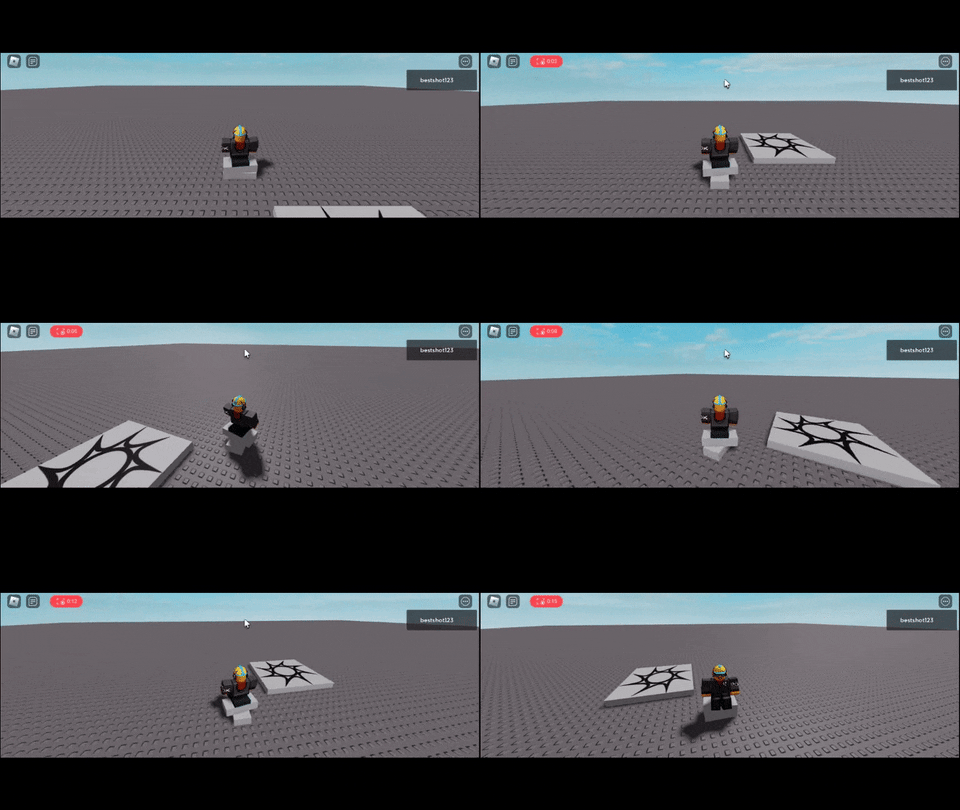
How would I make it so it goes around the back too?

2 comments

0

doesn't the Hinge have LimitsEnabled property enabled?

0

No I didn't enable limits

1 answer

Answering my own question: if anyone comes across this problem I found out you could just make the part.CFrame follow your mouse.Hit.P

local player = game:GetService("Players").LocalPlayer
if player then 
	player.CharacterAdded:Wait()
	wait()
end
	
	local mouse = player:GetMouse()
	if mouse then
		print("yes")
	end
	local target = player.Character.HumanoidRootPart
	local primary = workspace.Model.Primary

	game:GetService("RunService").Heartbeat:Connect(function()
		local mouseP = mouse.Hit.Position
		print(mouseP)
		local FromV3 = primary.CFrame.Position
		local ToV3 = mouseP

		primary.CFrame = CFrame.new(FromV3, ToV3)

	end)

Perfect for making turrets and works well no need to over do it :/

This discussion is preserved as it was. New answers, comments, and votes are closed.