Scripting HelpersARCHIVE
A little piece of Roblox history. Preserved for everyone, one question at a time.Read about the archive →
COMMUNITY QUESTION

How do i enable a LocalScript inside of PlayerGui via another LocalScript?

So what i am trying to do is: When you click an egg, it activates a Script (working), then at the end of that script, it activates a LocalScript (this code works too) but the problem is that, it gets activated but doesn't activate the one inside of PlayerGui

Here is the Code for the script that was supposed to activate the one in PlayerGui:

local PlayerGui = game.Players.LocalPlayer:WaitForChild("PlayerGui")
local Box = PlayerGui:WaitForChild("Egg1Box"):WaitForChild("Frame")
local LocalScript = Box:WaitForChild("LocalScript")

LocalScript.Disabled = false

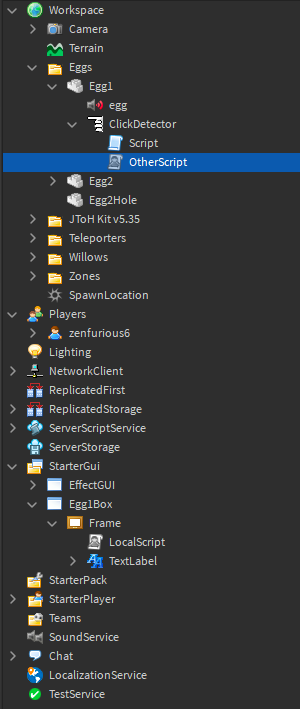
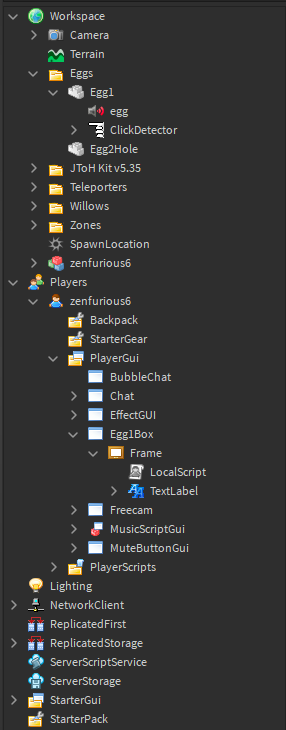
and here is my Explorer tab: When testing: https://i.gyazo.com/b1841f3fe7ec6de5717d73f7a7dbecea.png when not testing: https://i.gyazo.com/a9d4c88f65dd8b27fbc01d53b2821311.png
1 comment

1

put a print in the "Code for the script that was supposed to activate the one in PlayerGui" and see if it prints

2 answers

I think its not good idea to enable scripts from other scripts. You can do something like that: Second script:

workspace.IsActivated.Changed:Connect(function(val)
	--when other script set boolValue IsActivated to true
	if val == true then
		--do something	
	end
end)

First script


workspace.IsActivated.Value = true
--Run script

1 comment

0

Btw server-script can't see localscript changes

If you want to activate a LocalScript from a ServerScript then you will need a RemoteEvent. Since the script is in workspace you want it to be a ServerScript or it wont work. You should instead make the local script enabled, but is only triggered when it receives the remoteevent

-- server script --
local Event = Instance.new("RemoteEvent")
Event.Parent = game.ReplicatedStorage
Event.Name = "LocalScriptEvent"
script.Parent.ClickDetector.MouseClicl:Connect(function(player)
	-- Use the player parameter to get the player --
	local PlayerGui = player:WaitForChild("PlayerGui")
	local Box = PlayerGui:WaitForChild("Egg1Box"):WaitForChild("Frame")
	Event:FireClient(player)
end)

-- local script in player gui --
local Event = game.ReplicatedStorage:WaitForChild("LocalScriptEvent")
Event.OnClientEvent:Connect(function()
	-- put code that was in the playergui local script --
end)

Hopefully this answers the question. Also don't name it LocalPlayerEvent, name it something unique for this specific purpose that was just a test.

This discussion is preserved as it was. New answers, comments, and votes are closed.