
I'm trying to make a game kinda like satisfactory where you build conveyors to transport materials to make stuff. I’m trying to make the conveyors as of now but don’t know how?
What I tried (And failed) to use
I thought that using bones would be a greater start, but I can't figure out how to use them and the documentation isn’t that helpful.
I then thought about using pathfinding to connect two points with lines then convert them to conveyors.
Beams. They don't have collisions
I'm trying to make something like this
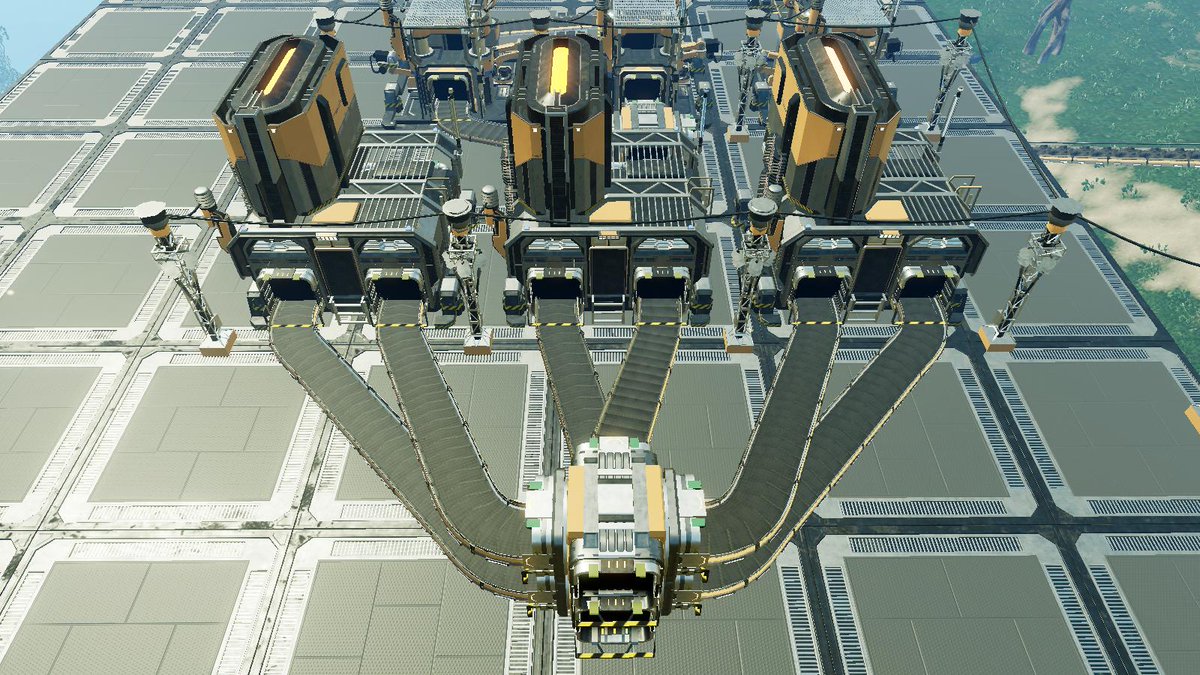
I'm not trying to make the conveyors move. I'm trying to make them curve to where they need to be.
What succeeded but sucked
local pos1 = workspace.A.Position
local pos2 = workspace.B.Position

local path = game:GetService("PathfindingService"):CreatePath()
path:ComputeAsync(pos1, pos2)
local points = path:GetWaypoints()

for i,v in ipairs(points) do
	local a
	local b

	if i == 1 then
		continue
	elseif i > 1 then
		a = points[i-1].Position
		b = v.Position
 	end

	local part = Instance.new("Part",workspace)
	part.Anchored = true

	local MiddlePosition = (a + b) / 2
	local c = (a - b)
	part.Position = MiddlePosition
	part.CFrame = CFrame.lookAt(MiddlePosition,b)
	part.Size = Vector3.new(1, 1,c.Magnitude)
end
1 comment
I know how to rotate them. I'm trying to make the conveyors move along a path, like in satisfactory