
Scripting HelpersARCHIVE
A little piece of Roblox history. Preserved for everyone, one question at a time.Read about the archive →
COMMUNITY QUESTION

Can you sort string values by alphabetical order?

Is it possible to sort string values by their name?
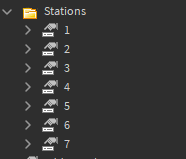
Image showing the explorer

local stationName = routeFolder.Stations:GetChildren()
for i = 1, #stationName do
	--in here is a script that basically generates a timetable from the children of the Stations folder
end

The reason I can't use the values in any order is because on the return journey the stations list needs to be read in reverse order (from 7 to 1) meaning I would need a way of sorting them by reverse alphabetical order too. I know you can sort tables but is there something similar I could use to sort this? Thanks!

1 answer

If you are only using numbers as station names you can convert the name into a number and then just compare greater and less to determine the order.

local Stations = {} -- Define table to insert stations into.
for i,v in pairs(workspace.Stations:GetChildren()) do -- Change "workspace.Stations" to wherever your stations are.
	table.insert(Stations,tonumber(v.Name)) -- Convert the station name into a number, and add it to the Stations table.
end
table.sort(Stations, function(a,b) -- Function to sort the table.
	return a<b -- If a is less than b, then put a below b. If you want to reverse the order change a<b to a>b
end)

for i,v in pairs(Stations) do -- Iterate through the stations table
	print(v) -- Print the stations in order.
end

--[[
Basic Rundown:
This code creates a table, adds all of the stations into the table, and then sorts the table from least to greatest (or if you change to A>B, then from greatest to least)
You can then iterate through the Stations table to do what you need to do.

]]

3 comments

0

The problem is that the station names aren't numbers - the string value names are numbers but the actual values in them are strings.

0

Ah I wasnt sure, I went based on your heirarchy in the picture you provided. According to that you named all the stations 1-7, which can be turned into numbers via tonumber. Another thing you could do if they are named "RedStation, "BlueStation", etc is add them all to a table when the game loads and use that tables index numbers to modify it from there.

0

If you create a table at the start that doesnt change, and is in the order they are supposed to be in, you can just always use that table to create a new, organized table.

This discussion is preserved as it was. New answers, comments, and votes are closed.