
Sorry I put it in CodeBlock this time.
--List of Map Selections
local maps = ("DownwardSpiral")
local boardbasic = game.ServerStorage["HoverBoardBasic"]
local STGUI = game.StarterGui.SystemGUI.Frame.Label
--Message and Map Randomizer
DownwardSpiral = game.Lighting.maps.DownwardSpiral
--Timer--
local timer = game.ReplicatedStorage["Time"]
--Main Game Script--
while true do
	STGUI.Text = "Loading..."
	print("Loaded")
	wait(5)
	game.workspace.IntermissionMusic:Play()
	STGUI.Text = "Intermission-"..timer.Value
	print("Displayed")
	wait(60)
	game.workspace.IntermissionMusic:Stop()
	end
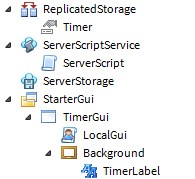
I'm creating a countdown timer for my game, and I don't want to write 122 lines of useless messaging code. I'm using a StringValue in the ServerScriptStorage and I set it to a number. I'm trying to make it display on the GUI counting down. It displays, but any method I tried didn't make it countdown. Here is my progress system for the game, and I write it as I go. My question is what code should I use to make it count down, and where to put it? Should I put it in a separate script or in the main?
1 comment
Well, you can't change all the player's GUI just by changing the StarterGui version. There are a few ways to solve this.