
Scripting HelpersARCHIVE
A little piece of Roblox history. Preserved for everyone, one question at a time.Read about the archive →
COMMUNITY QUESTION

GUI Timer Countdown?

--List of Map Selections
local maps = ("DownwardSpiral")
local boardbasic = game.ServerStorage["HoverBoardBasic"]
local STGUI = game.StarterGui.SystemGUI.Frame.Label
--Message and Map Randomizer
DownwardSpiral = game.Lighting.maps.DownwardSpiral
--Timer--
local timer = game.ReplicatedStorage["Time"]
--Main Game Script--
while true do
	STGUI.Text = "Loading..."
	print("Loaded")
	wait(5)
	game.workspace.IntermissionMusic:Play()
	STGUI.Text = "Intermission-"..timer.Value
	print("Displayed")
	wait(60)
	game.workspace.IntermissionMusic:Stop()
	end

I'm creating a countdown timer for my game, and I don't want to write 122 lines of useless messaging code. I'm using a StringValue in the ServerScriptStorage and I set it to a number. I'm trying to make it display on the GUI counting down. It displays, but any method I tried didn't make it countdown. Here is my progress system for the game, and I write it as I go. My question is what code should I use to make it count down, and where to put it? Should I put it in a separate script or in the main?
2 comments

0

Please reformat your code with CodeBlock in order to make it more readable.

0

Just fixed it

2 answers

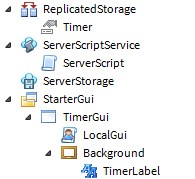
View the hierarchy here. The actual GUI size, color, etc. can be anything you like. Also, the name of the scripts don't matter, so they can be anything you want.

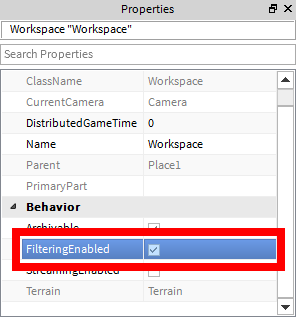
Make sure you have FilteringEnabled set to true.

"ServerScript"

local timeValue = game.ReplicatedStorage:WaitForChild("Timer")
local timerActive = false

-- YOUR CODE HERE (MOST LIKELY RANDOM FUNCTIONS, ETC.) --

while true do -- Infinite loop
	-- YOUR CODE HERE (PRE-TIMER) --
	timerActive = true
	timeValue.Value = 60 -- The time it starts with.
	
	while timerActive do
		wait(1)
		
		timeValue.Value = timeValue.Value - 1
		
		if timeValue.Value <= 0 then -- Can also check for other conditions
			timerActive = false -- Stop the loop
		end
	end
	
	timeValue.Value = -1 -- Clears the client-side timer to just "--:--"
	wait(3) -- Mostly for debugging so the "--:--" can be seen before being reset.
	
	-- YOUR CODE HERE (POST-TIMER) --
end

"LocalGui"

local gui = script.Parent
local label = gui:WaitForChild("Background"):WaitForChild("TimerLabel")
local timeValue = game.ReplicatedStorage:WaitForChild("Timer")

function formatTime(input)
	local output
	
	if type(input) ~= "number" or input < 0 then -- Makes sure it's a number, OR if it's a number and it's a negative number.
		output = "--:--"
	else
		local formatString = "%i:%.2i" -- This is just a formatting string.
		local seconds = math.floor(input % 60)  -- input % (modulo) 60 gets the remainder of the division of input and 60. Ex: input = 65; 65 % 60 is 5
		local minutes = math.floor(input / 60) -- math.floor rounds numbers down towards negative infinity. Just in case input / 60 is a decimal, it becomes a whole number.
		
		output = formatString:format(minutes, seconds)
		-- The "%.2i" in the formatting string adds leading zeros if the number is less than 10. No conditional if statements needed!
	end
	
	return output
end

timeValue.Changed:connect(function()
	local timeString = formatTime(timeValue.Value)
	
	if timeString then
		label.Text = timeString
	end
end)

-- YOUR CODE HERE --

The -- YOUR CODE HERE -- is where your code should go.

I hope this helped. If you have any questions, feel free to contact me or just post a comment on this answer.

I also noticed that you created a table incorrectly on your first line. It should be curly braces ({}), not parenthesis (()).

You could use this for the countdown. It would show the time remaining(i) until it reaches 0 and would end.

for i=60,0,-1 do --Sets the timer to 60 seconds, counting down by 1 until it reaches 0
wait(1)
STGUI.Text = "Intermission-"..i
end

2 comments

0

downvoted xD

0

this works too and is a really short script.

This discussion is preserved as it was. New answers, comments, and votes are closed.