
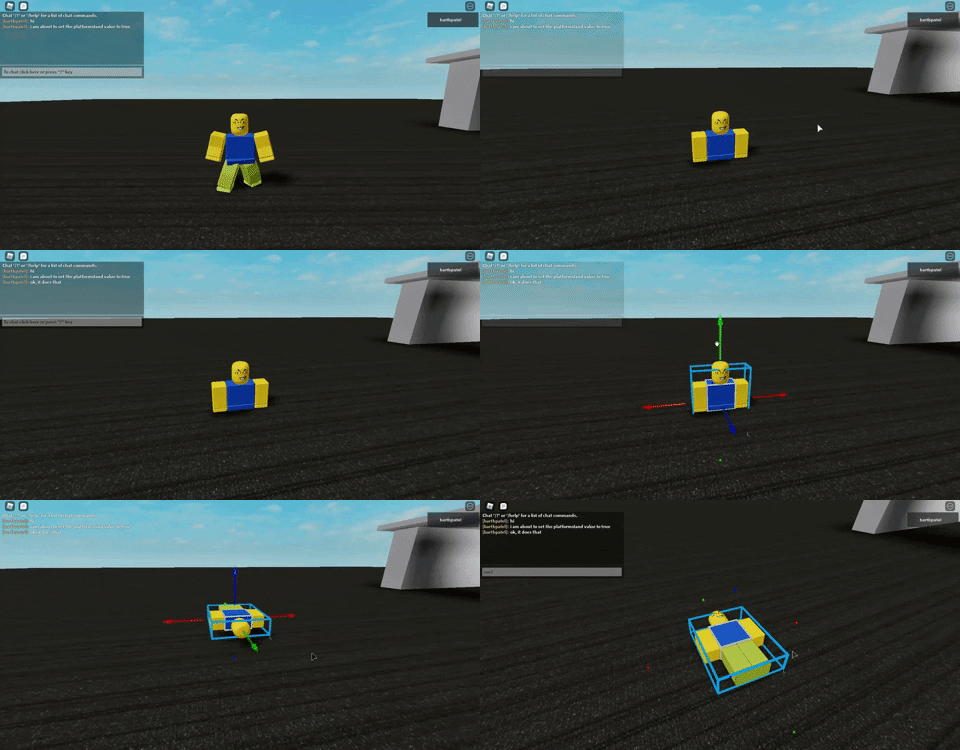
I want the punch to knock someone over. But this is what I use and it looks very rough. What is a more natural way to knock a player or character down like this?
HitChar:SetPrimaryPartCFrame(CFrame.new(HitChar.PrimaryPart.Position)*CFrame.Angles(math.pi/2, 0, 0))
I also tried this in a Server script:
local HitHumanoid = HitChar:FindFirstChild("Humanoid")

HitHumanoid:ChangeState(Enum.HumanoidStateType.Ragdoll)
wait(2)

HitHumanoid:ChangeState(Enum.HumanoidStateType.GettingUp)
I made a punching ability, but it's missing one feature. Knocking the players/NPC's over when I punch them. How do I knock over players?
PlatformStand is out of the question, because I want to knock players over not float them through the floor.
3 comments
You set that gif to private
Also, are you sure sitting them down would look natural?
ok it should be public now, also sitting is just an alternative to platform stand. it doesn't look too natural but it works at least.